Nielsen mobile app: stops sending data?
admin / March 20, 2026
I’m not sure what the issue is with the Nielsen Mobile app lately, but it seems to frequently stop sending data to Nielsen. This issue seems to appear only on iOS Apple iPad ninth generation use the latest update which is 17.2 but this has been going on for at least two updates ago.
I’m sure you’re asking yourself, why is it important for data to be sent to Nielsen?
Myself, along with other individuals, have chosen to opt-in by voluntarily downloading the Nielsen Mobile app to send data to Nielsen for market research in exchange for being credited to earn points in which those points can then be converted to purchasing gift cards or sending cash to PayPal and then from PayPal to use to making purchases or sending the money that you have in your PayPal account to your financial institution.
I have reached out to customer support to see if they can better advise on how to fix this issue but looking at the reviews on the Apple Store for this app it seems that customer service is telling users to reinstall and login again and doing this for the first time it was one little step that I couldn’t exactly figure out which now after doing this multiple times I now have this down to kind of step-by-step.
In this article, I’m going to cover how to reinstall and set this app up so whether this is your first time or if you run into this problem and you need to delete the app and reinstall it hopefully this guide will be helpful.
If you have the app installed on your iPad or your iPhone and you notice the screen looks like the screen that has been posted in the screenshot below it means that Nelson isn’t receiving anything from you which means you’re not receiving any credit.
Even if you click on the button that says “Send logs”, it fails.
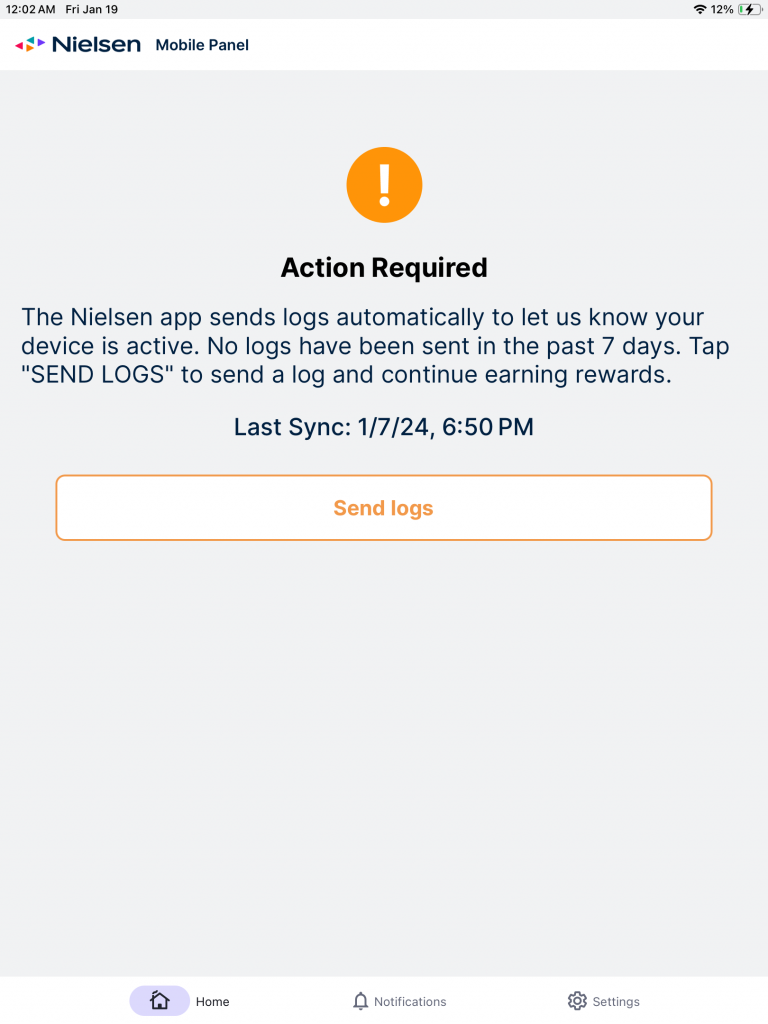
if you open up the Nielsen mobile app and you see this error message “Action required!
The Nelson app sends logs automatically to let us know your device is active. No logs have been sent in the past X days. Tap on “SEND LOGS“ to send a log and continue earning rewards.”, here are a few things you should try first:
first, try clicking on send logs
Second, make sure that you are connected to the Internet
third you can try contacting customer service to see what solutions they would offer if they offer any.