How to contact various companies through official channels?
admin / March 20, 2026
With the pandemic of coronavirus also known as COVID-19 many businesses are still not returning back to the office and people are working from home, the same for students. Many students have returned back to school unfortunately they are still handful of students who are still doing their schooling virtually.
Whether you were doing your work from home or your schooling computer problems are destined to occur thankfully if you work for a large corporation, business or you attend school where it is a school issued computer do you have an IT department that you can reach out to in order to have your computer issue hopefully resolved unfortunately if it is a personal computer or if you are a small business owner you may not be so lucky to have an IT department essentially right at your fingertips and this is where an issue can lead you into trouble if you are not careful.
Some may ask you to download software in order to scan your computer and tell you that your computer is infected and the only way to remove the infection is by paying them a fee when in fact your computer is not affected, others will impersonate a legitimate website in hopes that you don’t notice that they are impersonating a legitimate website in order to get your sensitive information.
A computer issue witch I think we all know how annoying and frustrating it can be, so we do what I think everyone does and that is search Google for the information. Sometimes a scam can be very sophisticated where it may not be easy to track down to successfully shut down the scam or once one it is shut down, another one pops up. No system is 100% perfect and sometimes the scammers are able to bypass the system.
When a website’s page matches the criteria of the specific search term, Google will sometimes make that a featured snippet along with the site’s admin adding some code to basically say; yes my site’s page can be used as a featured snippet. Sometimes a scammer is able to bypass the system or requirements so the scammer is able to show their number as a featured snippet so when someone types in a specific search term they are more likely to trust that than looking to see where it is coming from only to then later find out, the phone number that was showing in Google’s featured snippet is known to represent multiple companies witch some do not provide phone support.
Note: A featured snippet can appear like the one on the photo with a domain name or with a name and a phone number.

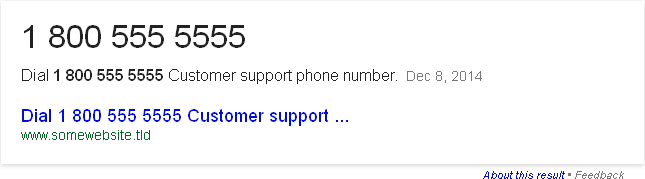
I find it astonishing how some of these scammers can create such sophisticated spams and get the fake phone number to show in Google’s featured snippet.
In no way am I saying or I am implying that every phone number that shows in Google’s featured snippet is fake, or part of some sophisticated spam, I am just trying to raise awareness that if you find a phone number in Google’s featured snippet it is most likely a genuine phone number, but you should always try to see where that phone number is coming from i.e. the source, or who put the phone number in Google’s featured snippet,or at least check to see the phone number is part of a scam by typing that phone number into Google to see what the search results turn up.
I wish all companies that sell goods and services post official ways of reaching them to hopefully stop scammers from acting like they are the company and charging people for something when they have no intentions of actually helping the person who is trying to get help instead they take someone’s money and the person is left high and dry.
Note: Well we may tell you to click on something that may not necessarily apply to your situation we are trying to get you the best and fastest way of getting the phone number or being able to chat with a live person in order to receive official support.
Amazon:
To contact Amazon follow these steps:
- Go to Amazon.com
- On the main page, scroll down the page until you see “Let Us Help You”, it’s on the right side and click on “help”.
- Under “Browse Help Topics”, look for “Need more help” then look for “Contact Us” and click on “Contact Us”.
- If you’re not signed in, you will need to sign in, so sign in.
- You should see your most resent orders; select an order if it applies, if not than just skip this and go on to the next step.
- Section two (2) you should see a drop-down menu, on the drop-down menu select “more order issues”, then a second drop-down menu will appear, in that drop-down menu select “other order question or issue” and now you should see section three.
- In section three you should see three buttons/links that say E-mail, phone, and chat.
While this is not the ideal way of getting support, they are active on their Facebook account, their Facebook account is https://www.facebook.com/Amazon. This is probably best for a general question, but anything more than a general question should be handled through Amazon.com.
PayPal:
- Go to PayPal.com
- Scroll all the way down to the bottom of the page, look on the right side and you should see a text that says “Help & Contact”, click on that link.
- On the top of the page you should see a yellowish or goldish bar talking about getting fake e-mails from PayPay, then under that you should see a link that says “call us” on the left and on the right says “email us”. (Note: If you don’t have an account with PayPal just click on “Help Center as a Guest” and the phone number will be displayed, even if you click on e-mail us.)
- Phone: If you clicked on call us, the next page will require you to sign in, please sign in if you’re not already signed in, if you are than you should see their phone number and a one-time pin that you will need to enter when prompted to.
Email: If you clicked on e-mail us, the next page will require you to sign in, so please sign in if you are not already signed in, if you are then you should see a drop-down menu, select what is the best match for your question or issue, enter your question or issue and then press send.
eBay:
- Go to ebay.com
- At the very top of the page, on the right side there is some links, on the end of this cluster of links you should see some text that says “Help & Contact”, click on that link.
- Scroll down until you see an image with a female and you should see a blue button that says “Contact Us”, click on that.
- If you’re not signed in you will need to sign it, so please sign in. (If you do not have an account with ebay, then click on “Continue”, then click on “account”, chose “someone has used my account” or you can click on “registration” then “register for a new account”, then you will see a button that says call us witch then gives the phone number to ebay.)
After you have signed in, you should see some icons, click on “account”, then click on “registration” then “register for a new account”, then you will see three buttons which are call us, which give you their phone number, call me, witch you enter your phone number and they call you, or you can ask in the community.
Malwarebytes:
- Go to malwarebytes.com (Note: When accessing malwarebytes.org, you will be redirected to malwarebytes.com.)
- At the top of the page, on the right side you should see a link that says “Support” click on support.
- If you purchased the home edition, click on “For home support”, scroll all the way down to the bottom of the page until you see a blue button that says “Contact Us Now”, click on that.
- Fill in the information that is required or that applies, then press send email.
While this is not the ideal way of getting support, they are active on their Facebook account, their Facebook account is https://www.facebook.com/Malwarebytes. This is probably best for a general question, but anything more than a general question should be handled through malwarebytes.com.
Microsoft:
- Go to microsoft.com
- At the top of the page, you should see a white navigation bar and on that navigation bar you should see a text that says “Support”, please click on that.
- Under the blue area you should now see four links, click on “contact us”.
- On this page you’ll ask you what can they help you with, for example if you need help with activating your copy of Windows then you can type in “need help activating Windows”, the support agent will probably be able to see this, also please note that if you type in something like “need help activating windows”, this will search the site for and display helpful tutorials on how to activate Windows for example so you may not need to contact Microsoft. If you say something like “need help activating Windows”, than the two drop-down menus will be filled in for you, so you may skip step five (5).
- Now pick product are you using
- On the left side you should see helpful solutions to the issue you’re having for example if you type in “need help activating Windows” than you will see some solutions on how to activate your copy of Windows. On the right side you will see four ways of receiving help witch are: call me back with an estimated wait time, schedule a call, live chat with an with an estimated wait time, and you can ask the Microsoft community witch employees of Microsoft and non-Microsoft employees meaning general public can try to help you.
- If you click on the top three links, you will need to sign in, so if you are not signed in, please sign in.
- Once you sign in if you click on:
Call me back; enter your country code, if you need to change your country code, then enter your phone number and press next.
Schedule a call; enter your country code, if you need to change your country code, and then enter your phone number, selected the date, and the time, then press confirm.
Live chat; the page will put you in the queue for the next available agent to assist you.